Set rules and let Connectoo handle follow-ups automatically. Trigger WhatsApp messages after missed calls, create tasks when leads go quiet, and alert managers when deals need attention — all without manual effort.
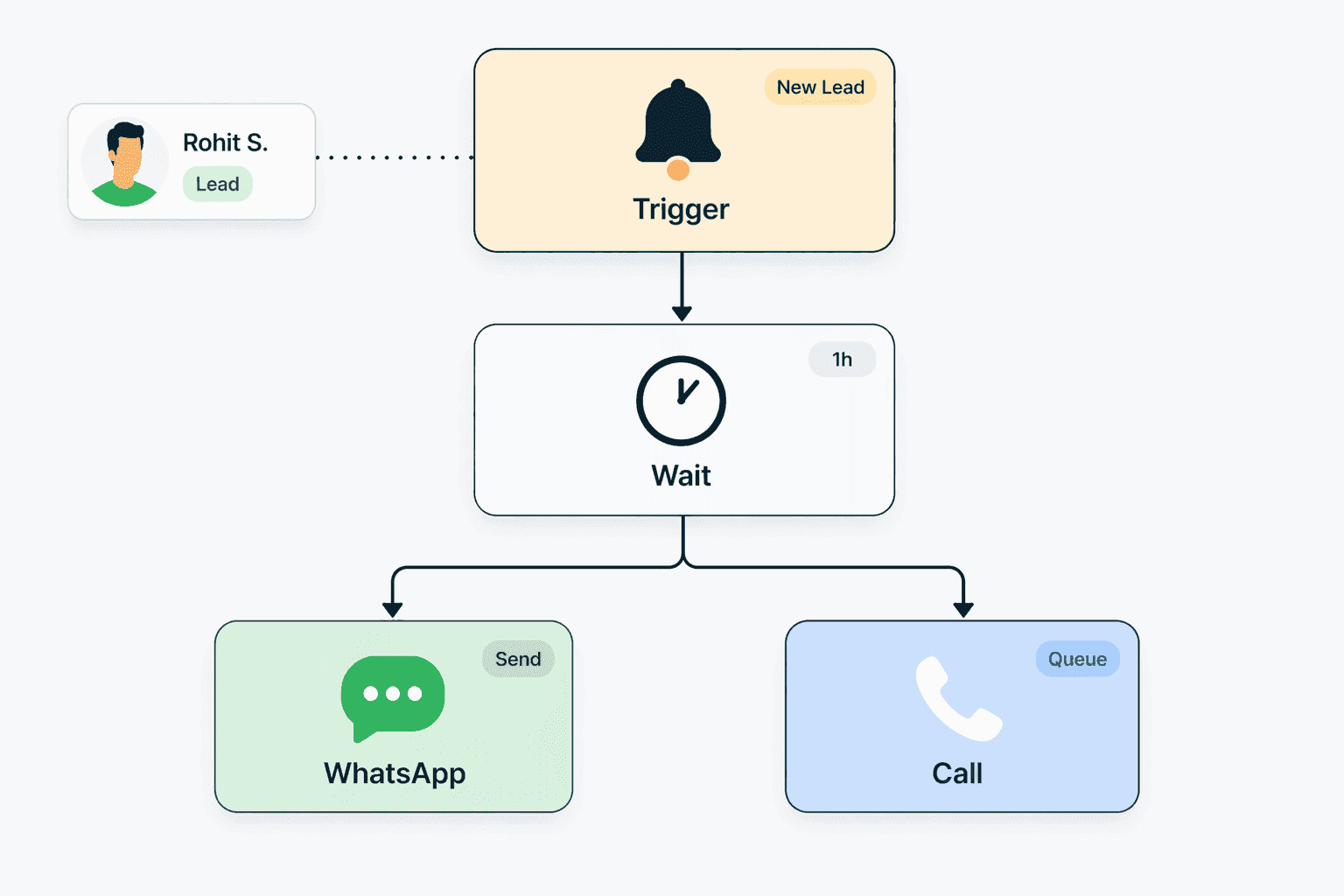
Auto follow-up workflows are rule-based automations that trigger specific actions when certain events happen in your CRM. Instead of relying on reps to remember follow-ups, the system handles it. In Connectoo, workflows operate across all communication channels — WhatsApp, VoIP calls, and SMS — so triggers and actions can span multiple channels. For example, a missed phone call can automatically trigger a WhatsApp message to the customer saying "Sorry we missed your call, how can we help?" Or a lead who has not responded to a WhatsApp message in 48 hours can generate a task reminder for the assigned rep. These workflows eliminate the biggest source of lost deals for teams of every size: forgotten follow-ups. Studies show that 80% of sales require at least 5 follow-up contacts, but most reps stop after one or two. Automation ensures persistence without the manual burden.
Connectoo workflows use a simple trigger-condition-action structure. You define what event starts the workflow (trigger), optional filters that narrow when it fires (condition), and what Connectoo should do (action). Triggers include: missed call, unanswered WhatsApp message, new contact created, call duration under a threshold, or time elapsed since last interaction. Conditions let you filter by contact tags, deal value, assigned rep, or time of day. Actions include: send a WhatsApp template message, create a follow-up task, assign conversation to a rep, send an internal notification, update a contact field, or escalate to a manager. Workflows are created through a visual builder on the Growth and Scale plans — no coding required. You can chain multiple actions together and set time delays between steps. For example: after a missed call, wait 5 minutes, send a WhatsApp message, then if no reply in 2 hours, create a task for the rep.
The key advantage of Connectoo workflows over competitors is cross-channel automation. Unlike TimelinesAI which can only automate within WhatsApp, or Runo which can only automate around phone calls, Connectoo triggers actions across all channels. A missed VoIP call can trigger a WhatsApp message. An unanswered WhatsApp message can generate a call task. An SMS bounce can trigger an alternative WhatsApp outreach. This cross-channel capability exists because Connectoo is the only CRM that unifies WhatsApp, VoIP calls, and SMS in one platform. When all communication data lives in one system, workflows can reference any channel as both trigger and action. Teams using separate tools for WhatsApp and calls cannot achieve this without complex integrations — Connectoo provides it out of the box with zero technical setup.
Connectoo ships with pre-built workflow templates that any team can activate immediately. The Missed Call Recovery template sends an automatic WhatsApp message within 5 minutes of a missed call, then creates a callback task if the customer does not reply within 2 hours. The Stale Lead Re-engagement template detects contacts with no interaction in 7 days and triggers an outreach sequence. The New Lead Welcome template sends a WhatsApp greeting when a new contact is added to the CRM, introducing your team and asking how you can help. The Escalation Alert template notifies managers when a high-priority contact has been waiting more than 4 hours for a response. Each template is fully customizable — you can adjust timing, message content, conditions, and actions to fit your team's specific process. Teams typically start with one or two templates and add more as they see the impact on response rates and conversion.
Businesses of all sizes that implement automated follow-ups see measurable improvements in conversion rates and customer satisfaction. The reason is simple: speed and consistency. When a customer calls and nobody answers, a follow-up WhatsApp within 5 minutes keeps the conversation alive. When a lead goes quiet, an automated nudge after 48 hours re-engages them before they move to a competitor. Manual follow-up processes break down because reps get busy, forget, or prioritize incorrectly. Automation removes human error from the equation while keeping the communication personal — customers receive timely, relevant messages without knowing they are automated. For teams of every size, this is transformative. A 10-person sales team making 200 calls per day might miss 30 calls. Without automation, maybe half get followed up. With Connectoo workflows, every single missed call gets a response within minutes — automatically.
Connectoo Auto Follow-Up Workflows is designed for specific team roles and use cases. Here are the teams that benefit most from this feature.
Teams that miss follow-ups due to high call volume or busy schedules can automate every follow-up so no lead goes cold. Workflows handle the persistence that manual processes cannot sustain.
Support teams with response time targets can use workflows to escalate unanswered queries, assign backup reps, and notify managers when SLAs are at risk.
Sales and support managers who need every customer to receive a consistent follow-up experience regardless of which rep handles the conversation.
See how Connectoo Auto Follow-Up Workflows compares to handling this process manually. The table below shows capabilities that Connectoo automates versus what teams typically do without a dedicated tool.
| Feature | Connectoo | Manual Process |
|---|---|---|
| Auto WhatsApp message after missed call | ✓ | ✗ |
| Task creation for stale leads | ✓ | ✗ |
| Cross-channel triggers (call to WhatsApp) | ✓ | ✗ |
| Time-based follow-up sequences | ✓ | ✗ |
| Manager escalation alerts | ✓ | ✗ |
| Pre-built workflow templates | ✓ | ✗ |
| Consistent follow-up for every lead | ✓ | ✗ |
Connectoo features work together as a unified communication CRM. Explore these related capabilities that complement Auto Follow-Up Workflows.
Explore more guides, features, and comparisons related to this topic.
Start using Connectoo Auto Follow-Up Workflows today. Free plan available with no credit card required. Upgrade to Growth or Scale for the full feature set.
Start Free Today